
Some bugs jump out the moment you look at the code. Timezone bugs don’t: the API returns the right data, the database is fine, the UI looks great, and yet the final result is wrong.
A team sets up a notification, “Good morning! Ready for today?”, scheduled for 8:00 for Japanese users. The server runs on UTC, so the message actually lands at 17:00 JST, right as people are squeezed onto the train home.
If your app serves a single timezone, you rarely think about this. But once the server, the database, and your users sit in different timezones, things get tricky. Worse, timezone bugs rarely show up right away. A feature works fine most of the time, then breaks only near midnight, at the start of a new month, or after deploying to a server whose timezone differs from the development environment.
I wrote this post after a bug I ran into about a month ago in a client project. The booking acceptance date was displayed wrongly: a booking made at 20:00 JST appeared as 05:00 the following day, 9 hours ahead of the actual time.
Same moment, different interpretations
Say we’re building a booking system for customers in Japan. A user books a room at 10:00 on 2026-11-20, Japan time (JST, UTC+9), while the backend and database run on UTC. These two values represent the same moment:
Japan (JST): 2026-11-20 10:00:00
UTC: 2026-11-20 01:00:00
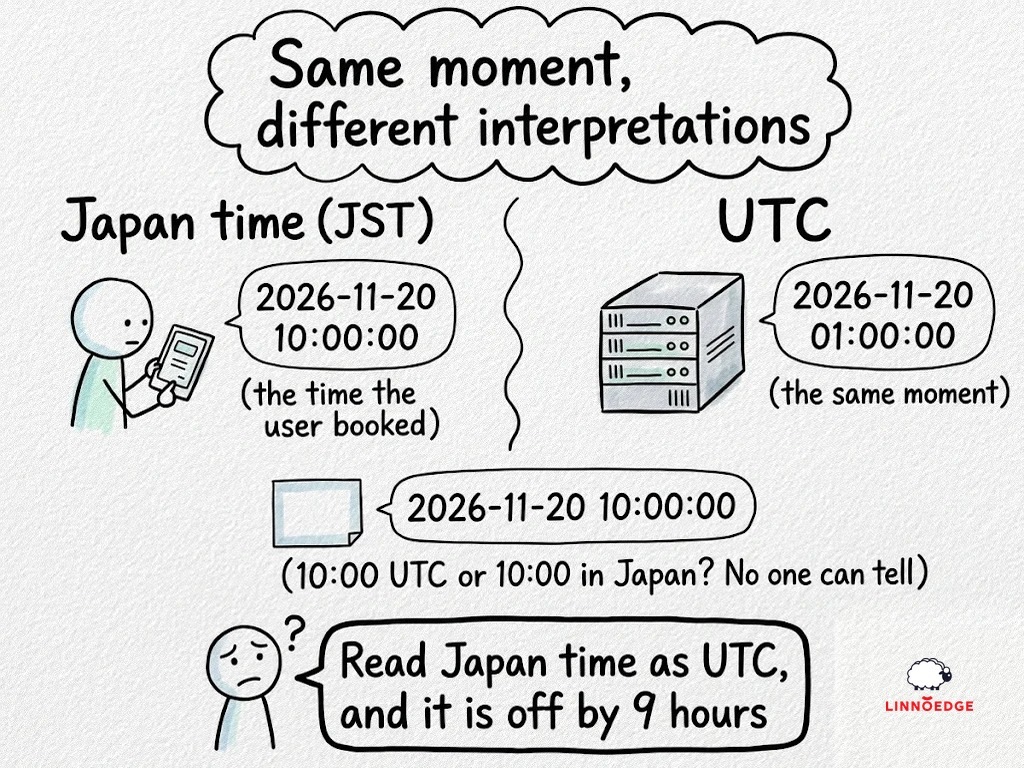
With a sound design, converting between them is easy. The real problem is elsewhere: a value that carries no timezone information but gets used as if it did. For example, the database stores:
2026-11-20 10:00:00Looking at this, nobody can tell whether it’s 10:00 UTC or 10:00 in Japan. If the backend reads it as UTC while the data is really Japan time, you’re off by 9 hours. Consequences can include:
- Bookings shown at the wrong time.
- Cancellation deadlines calculated incorrectly.
- Subscriptions expiring earlier or later than expected.
- Revenue reports recording transactions on the wrong day or month.
- Batch jobs and cron jobs running at the wrong time.
The annoying part is that these bugs don’t all appear together. Screen A shows the right time, while feature B, using the same data, gets it wrong. That’s why debugging timezones often takes longer than expected.
“Just store UTC”? Not quite enough
Storing times in UTC is a good rule, but on its own it isn’t enough. First, we need to distinguish two kinds of time data.
In that project, I decided to store every absolute timestamp in UTC and to display it in the user’s business timezone. The reason is to keep the interpretation of time data consistent across the whole system and to prevent timezone offset problems.
A specific moment (instant)
A real point on the timeline: when a payment succeeded, when a booking was created, when a transaction was updated, or when a token expires. These should be stored as absolute moments, usually in UTC, so they compare correctly no matter where the server is.
2026-11-20T01:00:00ZThe Z means UTC. To show it to a user in Japan, convert it to Asia/Tokyo and you get 10:00 on the same day.
A business date
Not every date needs converting to UTC. When a user books a room for 2026-11-20, “November 20” is the day of the stay, not a specific instant. Convert it back and forth between timezones and it may turn into November 19.
The most common example is a birthday. A user was born on November 20, but after one conversion their profile says November 19, and the app cheerfully wishes them happy birthday a day early. The user isn’t upset, just slightly unsure whether they or the app got it wrong.
For booking dates, birthdays, holidays, or price-effective dates, a DATE type is usually the better fit.
The key point: it’s not about converting everything to UTC. It’s about knowing which data is a moment and which is only a date.
Three common traps
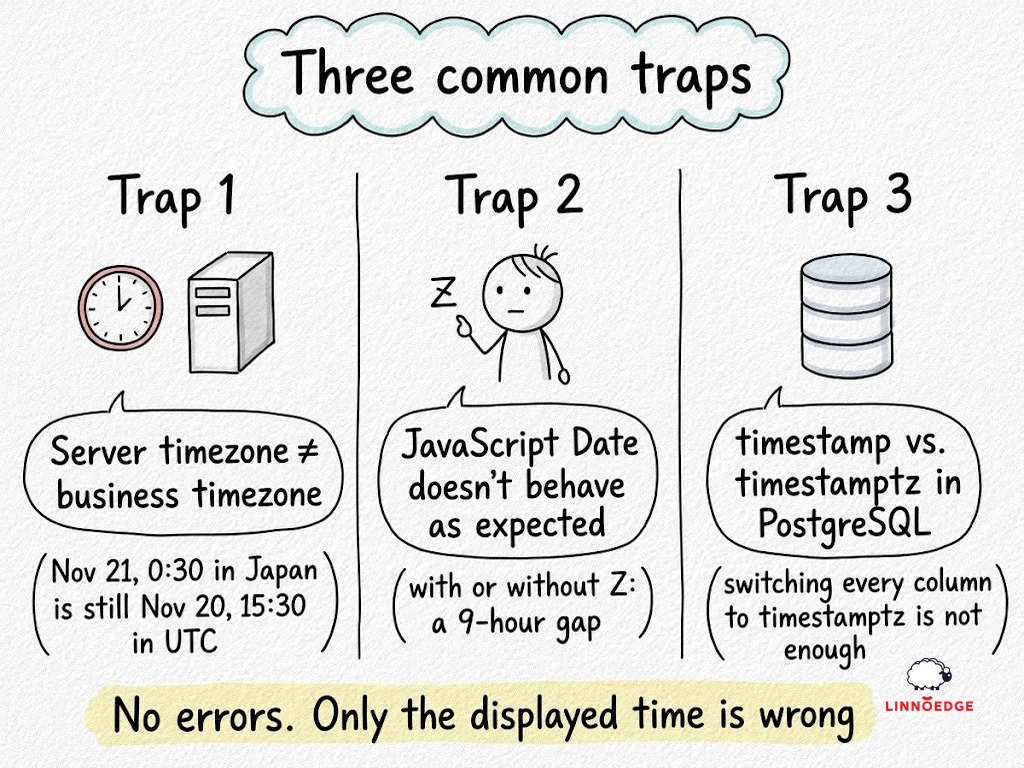
Trap 1: Server timezone ≠ business timezone
A common mistake is using the server’s default timezone for business rules, such as working out “what’s today’s date in Japan.”
const today = new Date();This line isn’t wrong: it gets the current moment correctly. But once you call getDate(), getMonth(), or getFullYear(), the result depends on the runtime’s timezone.
At 00:30 on November 21 in Japan, it’s still 15:30 on November 20 in UTC. A backend using UTC will think today is still the 20th, while users in Japan are already on the 21st.
Picture an app with a daily login bonus that resets at midnight. The server runs on UTC, so the bonus actually resets at 9:00 a.m. Japan time. Dedicated users who stay up until midnight to claim it just get “You’ve already claimed today’s bonus.” With booking, billing, or subscriptions, the same kind of drift directly affects the outcome.
A compact rule:
- Comparing moments: use instants, usually expressed in UTC.
- Determining the business date: use the timezone of the market you serve, specified explicitly rather than relying on the server.
// “Today” in Japan time, independent of the server
const todayJP = new Intl.DateTimeFormat("en-CA", { timeZone: "Asia/Tokyo" }).format(new Date());
// => "2026-11-21"
Trap 2: JavaScript Date doesn’t behave the way many people think
const a = new Date("2026-11-20T10:00:00"); // no Z
const b = new Date("2026-11-20T10:00:00Z"); // with Z
a has no Z or offset, so JavaScript treats it as the local time of the machine running it: a development machine set to Japan time gives one result, while a UTC server gives another. b is always a fixed moment in UTC. The two lines differ by one character but can be 9 hours apart.
Likewise, when the backend returns a timestamp without a timezone and the frontend parses it on its own, the API reports no error, the frontend reports no error, and only the displayed time is wrong.
Trap 3: timestamp vs. timestamptz in PostgreSQL
| Type | Meaning |
|---|---|
| timestamp without time zone | A “bare” date and time; PostgreSQL doesn’t know which timezone it belongs to. |
| timestamp with time zone (timestamptz) | An absolute moment; stored normalized and displayed in the session’s timezone. |
However, switching every column to timestamptz won’t make the system correct by itself. If existing data is stored in Japan time but the migration assumes UTC, every existing value ends up wrong. On a system with production data, this step needs very careful checking.
Why timezone bugs are so hard to catch
In my experience, timezone bugs tend to hide behind environmental conditions, for three main reasons.
They depend on when you test. A developer tests at 10 a.m. and everything works. A user does the same thing at 23:50 and gets a completely different result. These bugs are like the neighbor’s cat: call it and it never comes; turn your back and there it is.
Old and new data follow different conventions. New data is stored correctly in UTC, old data is still in Japan time, and both sit in the same column. Checking only a few recent records makes the problem very hard to spot.
Time logic is scattered. The frontend formats dates, the backend checks conditions, the database stores values, cron jobs run automatically, and third-party services have their own timezones. When a bug appears, we look at the broken feature, and few people suspect a conversion step somewhere far away.
So fixing a timezone bug shouldn’t stop at “add 9 hours so it displays correctly.” That may cure one spot while making another one sick. The same kind of hidden environment-dependent failure is explored in Why all tests pass but code still breaks in production.
How I approach timezone problems
- Identify what the data means. Is the value a moment or a business date? paymentCompletedAt is the moment of payment, while bookingDate may just be the day of the stay. The two don’t have to be handled the same way.
- Check the whole data flow, not just the UI. Ask yourself:
- Which timezone was the data originally created in?
- Does the API return strings with an offset?
- What rules does the backend use to parse times?
- What data type does the database use?
- Is there any step that converts timezones automatically?
- Standardize handling across the codebase. If many places need to know “what day is it in Japan,” use shared helpers (get the business date, convert timezones, compare moments) instead of each developer writing their own version.
- Add tests for the “danger hours.”
- Just before and after 00:00 in the business timezone.
- The last day of a month and the first day of the next.
- The last day of the year and the first day of the next.
- Expiry conditions after a set period of time.
- Old data created before timezones were standardized.
- Timezones with daylight saving time, if the app supports those regions.
A test that passes at 10:00 isn’t guaranteed to pass at 00:05.
Conclusion
The hardest part of timezones isn’t converting UTC to Japan time. It’s making the whole system understand a time value with the same meaning. A conversion function takes a few minutes to write, but if you don’t know what convention the input follows, the result will still be wrong.
A few hours of drift might only make a “good morning” arrive in the afternoon. But with booking, payments, subscriptions, or revenue reports, it can lead to wrong business decisions. So don’t treat timezones as just a date-formatting issue in the UI.
A small checklist to take with you:
- When designing data, clearly separate moments from business dates.
- Times passed through the API always include Z or an offset.
- “What day is today” logic uses the business timezone, not the server’s.
- Tests cover 00:00, month-end, and year-end.
- Production data migrations include a verification step, not mechanical offset math.
A little extra time up front saves a lot of effort later, and spares you bugs that only appear at midnight.
Shared helpers and a team-wide convention only pay off if someone other than their author can pick the code up later. We wrote about that in Your Software Works. But Can Someone Else Maintain It?
If you are planning a system where the server, the database, and your users sit in different timezones, you can read about our system development service.
FAQ
Why do timezone bugs show up only at certain times?
Because the result depends on when and where the code runs. A feature can work fine most of the time, then break only near midnight, at the start of a new month, or after deploying to a server whose timezone differs from the development environment. A test run at 10:00 may pass while the same test at 00:05 fails.
Is storing every time in UTC enough?
No. UTC is a good rule for a specific moment, such as when a payment succeeded or when a token expires. But a business date, such as a booking date, a birthday, or a price-effective date, is not a moment. Converting it between timezones can shift it by a day, so a DATE type is usually the better fit.
Which cases should tests cover for timezone bugs?
Add tests for the danger hours: just before and after 00:00 in the business timezone, the last day of a month and the first day of the next, the last day of the year and the first day of the next, expiry conditions after a set period of time, old data created before timezones were standardized, and daylight saving time if the app supports those regions.
Does your system behave differently depending on where it runs?
If you are planning a project, or you have a system whose results change with the server or the timezone, let’s talk.
Contact Us →
Tho Nguyen
Fullstack Developer · Linnoedge Inc.
Building web applications with modern technologies across frontend and backend. Passionate about scalability, performance, and continuous improvement.