Linnoedge

LinnoEdge
AI Operations Portal · AiGen-One

AI tools multiplied.
But the work between them
still runs on people.

AiGen-One is an AI operations platform: build a business system just by talking, add the AI workflows you need as plugins, and let your whole team use them from one internal portal.

  • Build by talking — say “I want to manage inquiries in one list,” and the system gets built.
  • Add as plugins — meeting minutes, proposal drafting, document search, and more, installed in one click.
  • Used by everyone — your team works from the portal, without learning each AI tool or model name.
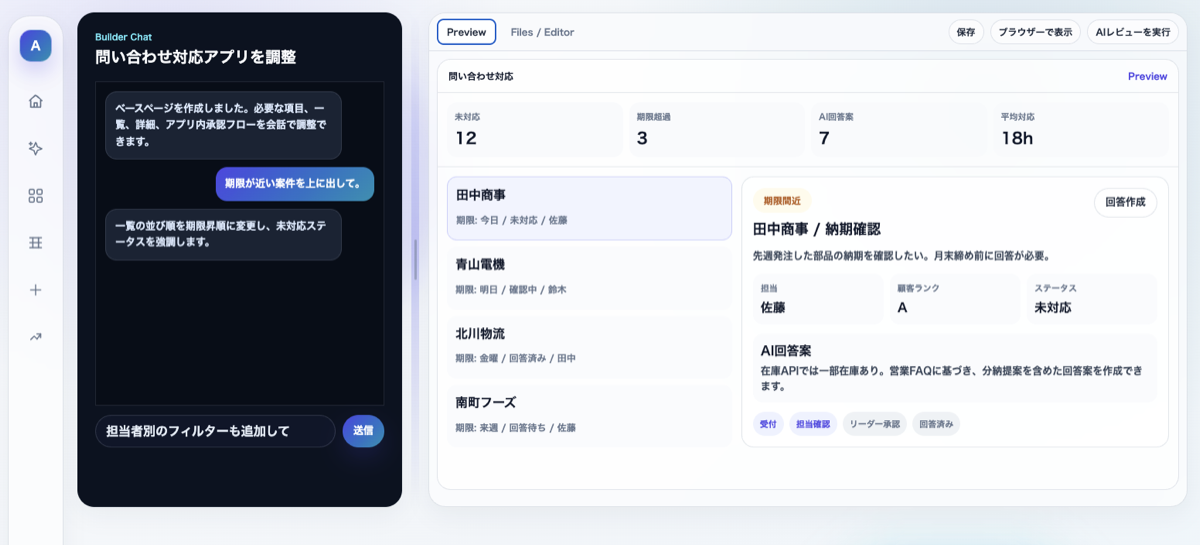
Example AiGen-One screen: describe the work in the chat on the left, and an inquiry-management app — with metrics like open, overdue, AI-drafted reply, and average response time — is generated on the right.
What is happening in companies

AI tools multiplied. The work is still fragmented.

ChatGPT, Gemini, NotebookLM, Claude, Copilot. The tools are useful — but on the ground, people still switch between tools, copy results across, reorganize them, and share them by hand.

01

Usage differs from person to person

Useful prompts and settings stay locked inside individuals, instead of becoming a shared team or company asset.
02

AI output still gets moved back by hand

Summaries and drafts get faster, but in the end a person re-enters and tidies the results into your systems.
03

It doesn’t connect to your data or permissions

It’s hard to govern who can see what, and which files an answer was based on.
The real problem
It isn’t that AI is hard to use — it’s that AI is hard to distribute, govern, and improve as company operations.
That’s the gap AiGen-One was built to close.
Demo · e.g. internal document search

Turn “searching” into “asking.”

The easiest first step is internal document search. AiGen-One reads across your PDFs, Word, Excel, and PowerPoint, and answers with the source file it relied on. See it working in a short demo.

AiGen-One · Document search
What’s our remote-work allowance policy, and where is it written?
Answer · with sources
Remote work is available company-wide. The monthly allowance and who is eligible are set in the HR handbook. Here’s the answer, with the files it’s based on.
PDF HR Handbook 2026.pdf — §4 Remote Work
XLSX Allowance rules.xlsx — “Remote” sheet
↳ about this demo This recording is from a build about two weeks old, so some screens differ slightly from the latest. The flow — from question to cited source — is the same.
How AiGen-One works

Build it, add to it, and start using it.

Turn frontline language into a business system, add the AI workflows you use most as plugins, and let your team use everything from one portal.


Describe the work problem, and AiGen-One generates a business system
PILLAR 01
Build by talking
“I want to manage inquiries in one list.” “I want proposals from meeting notes.” Describe it in plain words. AiGen-One organizes the fields, screens, workflow, and AI assistance into a working system. No spec document required.
Adding and using AI workflow apps as plugins
PILLAR 02
Add as plugins
Common AI workflows install as verified plugins in one click. No core-system rebuild — you add AI alongside the way your team already works, and start small.
Team members using generated AI workflows from the portal
PILLAR 03
Used by everyone
Generated systems and plugins live in one portal. Your team uses them as part of daily work, without memorizing tool or model names.
Meeting
Meeting Minutes
Turn audio, transcripts, and notes into key points, decisions, to-dos, owners, and deadlines.
Sales
Proposal from Notes
From sales notes, draft the customer problem, proposal direction, structure, and slide copy.
Knowledge
File Sharing RAG
Search across PDFs, Word, Excel, and PowerPoint, and answer with cited sources.
Global
Multilingual Chat
Members who speak different languages communicate naturally in one chat.
How it works

From frontline language to a working system.

No technical knowledge needed. Through conversation, AiGen-One clarifies the inputs, outputs, reference files, permissions, notifications, and where AI should help.

STEP 01
Describe the problem
Tell it the everyday problem: “meeting wrap-ups take forever,” “I need to find internal documents.”
STEP 02
AI asks for requirements
Who uses it, which fields it needs, whether approvals or notifications exist, and which files to reference.
STEP 03
Generate the system
Lists, input forms, detail views, search, summaries, and document generation — built for the workflow.
STEP 04
Place it in the portal
The new function appears in the portal’s work menu. Your team can start using it right away.
// What you can rely on
NO REBUILD
Plugins deploy without touching your existing core systems.
SAME-DAY START
Begin with one workflow and validate the impact the same day.
CITED ANSWERS
RAG answers name the source file they relied on.
FULL AUDIT LOG
Every generation records who, which function, and what it referenced.
How it differs from AI tools

AI tools are personal tools.
AiGen-One is an organizational system.

Even with the same generative AI, “an individual chatting to work faster” and “a company distributing and governing it as operations” are two very different things.

Standalone AI tools

A tool an individual uses

  • Usage and prompts stay personal, rarely shared
  • No company-level record of who generated what
  • Hard to manage permissions or connect to existing systems
  • The frontline relearns with every new feature
VS

AiGen-One

A system an organization runs

  • Inputs, references, and outputs are fixed as workflows — quality stays stable
  • Every generation is logged — who, which function, what was referenced
  • Distribute and control by department and role
  • Model updates are absorbed by AiGen-One — the frontline doesn’t relearn

Turn AI’s progress into operational gain —
not another learning cost for your team.

Governance & operations

Not just useful —
built to be governable.

What matters with business AI is being able to trace who saw what, what was generated, and which function was used. AiGen-One is designed so you can govern AI usage as a company.

Principle 01

AI can’t see what users can’t

Sync your existing org permissions with the AI’s reference scope. Control accessible files and functions by department, role, and user.

Principle 02

Every reference, recorded

The usage log captures who generated what, with which function, from which information. RAG answers cite the source files.

Principle 03

Governed centrally

Admins manage prompts, model settings, screens, and logic in one place. Even moving to the latest LLM doesn’t break existing functions.

Not a tool you’re handed —
a working operation we deliver.

Linnoedge stays with you from implementation design through operation and maintenance.

Pricing

Start small. Expand once you’ve seen the impact.

Begin with AI workflow plugins that need no core-system rebuild. Initial setup and monthly fees are scoped to your team size and rollout. Confirm the ROI, then expand step by step into systemizing frontline work and a company-wide portal.

How small-start works
Not a company-wide rollout — one high-impact workflow first.
Start with functions that deliver value even without core-DB integration — meeting minutes, file-sharing RAG — confirm ROI, then expand.
See pricing plans
PlanMonthlyPrimary users
Business User¥800 / user (~$5)Staff who use the business apps
AI User¥2,800 / user (~$18)Staff who research / consult with AI (internal knowledge search, MCP Access)
Workspace User¥5,800 / user (~$38)People who build and improve apps
Org Admin¥6,800 / user (~$45)Department managers and business owners
System AdminIncluded / add-onIT and global administrators
Initial setup ¥500k–1.5M (~$3,300–10,000)  /  Platform base ¥150k/mo (~$1,000)  /  Plugin fee ¥30k–150k/mo per plugin (~$200–1,000)  /  Industry plugin set ¥200k–500k/mo (~$1,300–3,300)
Actual configuration and pricing are quoted in your first session, based on team size and scope.
Rollout steps

Start small, grow into an AI operations foundation.

Begin with AI workflows that need no system changes, then expand into systemizing frontline work, portal operations, and agents. Each phase’s timing flexes to your scale and priorities.

PHASE 1
Ready-to-use AI plugins
PHASE 2
Systemize frontline work
PHASE 3
Company-wide portal
PHASE 4
Autonomous agents
PHASE 5
External marketplace

Bring the problem you’re facing right now.
We’ll figure out together which workflow to start with for impact.

FAQ

Common questions before adopting AiGen-One

No. Plugins like meeting minutes and file-sharing RAG deploy with no core-system changes, so you can start same-day and validate impact. They sit alongside your existing workflows.
Our design principle is “AI can’t see what a user can’t see.” We sync your existing org permissions with the AI’s reference scope, controlling accessible files and functions by department, role, and user.
Instead of letting people prompt the model directly, we use structured input/output defined per workflow through the UI. RAG answers cite the source file name, keeping accuracy at a business level.
The usage log records who generated what, with which function, from which information — useful for incident tracing and for deterring shadow AI.
From a single high-impact plugin like file-sharing RAG. Initial setup and monthly fees scale to your team size and scope.
When the underlying LLM evolves, AiGen-One updates the prompts and logic on its side. You get the benefit without breaking existing functions — and your team doesn’t have to relearn.
Linnoedge stays with you from implementation design through operation and maintenance — distributing and updating plugins, designing permissions, and surfacing usage.
Free first session

Before adding another AI tool,
embed AI into the work.

Bring the problem you’re facing, and we’ll figure out together which workflow to start with — the small-start setup and the path forward.

1
Book a free session (online, 30 min). We can show you a demo first.
2
Bring your current problem — meeting notes, document search, inquiry management; any frontline challenge.
3
Leave with a small-start plan — which workflow, at what scale, plus a ballpark quote.
Delivered & supported by
Linnoedge stays with you from implementation design through operation and maintenance.
Shogo Harada
CEO, Linnoedge